Cromwell 是 Broad Institute 开发的工作流管理系统。通过 Cromwell 可以将 WDL 描述的 workflow 转化为批量计算的作业(Job)运行。是目前非常流行的一个用于生物信息学的开源工作流程管理系统。
软件本身有专门的文档管理站点 Cromwell Readthedocs , 如果有问题也可以在社区仓库查看相关项目或提交代码 Cromwell Github。
截至目前 Cromwell Download 已经发布了多个版本,在我们要使用先下载对应的执行软件,不同版本可能存在细节差异,本教程撰写的时候使用的是 v84 版本,所以如果最新版本万一存在不兼容的情况,可能需要切换到对应的版本,当然也欢迎大家反馈留言,基于最新版本提供相关修正说明。
1 | wget https://github.com/broadinstitute/cromwell/releases/download/84/cromwell-84.jar |
其实简单的 cromwell 应用,在我们下载对应执行软件后,就可以直接使用命令投递基于wdl 语法撰写的工作流来进行任务投递。wdl的撰写可以参考我们之前的的文章,在此不再进行赘述。
1 | java -jar cromwell.jar run pipeline.wdl -i input.json |
这是最简单的一种最简单的任务投递模式,我们不需要进行任何额外的配置。这里的简单指的是:
- 任务运行在当前计算节点(不涉及跨节点的任务调度,也不涉及集群调度)
- 任务运行在当前环境,不涉及镜像,没用使用容器化、虚拟化。
- 任务数据在当前路径,不涉及云存储。
如果我们的任务本身不涉及这些需求的化,那么直接使用run模式进行任务投递已经足够满足我们的分析需求了。
进阶配置
之前我们介绍了最简单的 run 模式,但是 run 默认是在当前环境、当前节点进行任务投递的,这最多只能用于我们前期的流程开发阶段,肯定满足不了后期业务落地应用的需求。因此我们需要对我们的投递过程进行升级,让我们的任务可以跨节点、支持容器化环境的运行。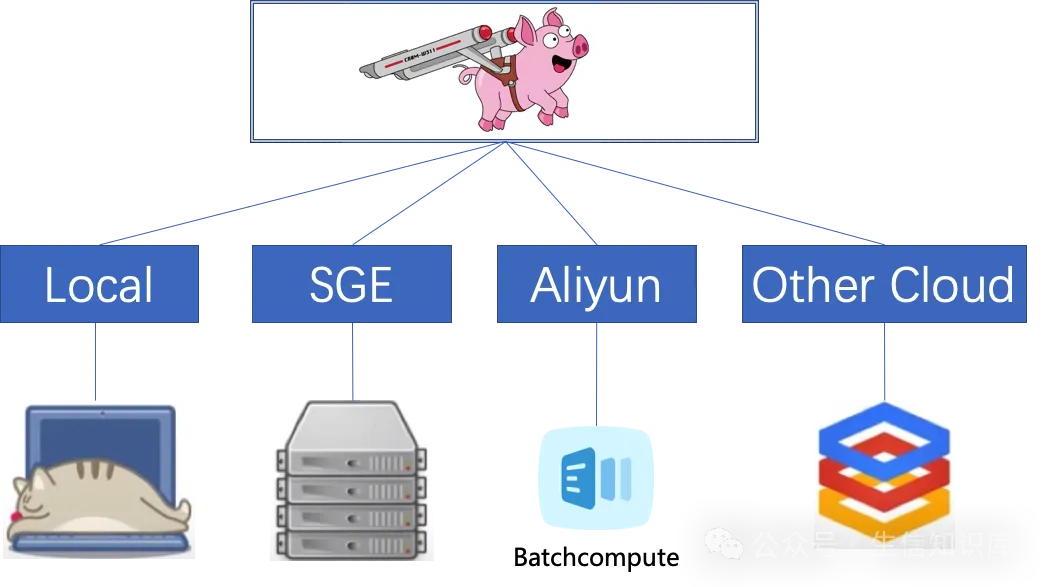
这部分升级也不复杂,我们只需要在投递阶段添加指定对应的配置文件 -Dconfig.file=/path/to/yourOverrides.conf 就可以实现我们的需求。
1 | java -Dconfig.file=/path/to/yourOverrides.conf cromwell.jar run pipeline.wdl -i input.json |
通过 -Dconfig.file=bcs.conf 指定cromwell执行过程的配置文件。 可以让cromwell在 SGE、AWS、Docker 等多种平台和容器环境下执行 wdl 开发的流程 。官方针对多种场景都提供了配置文件模板,可以通过简单的配置实现基于各平台的调度。
在这里,我们以最常见的 SGE & docker 作为示例,介绍一下配置文件。
后台配置 backend
进行任务投递时, backend 是我们使用最多也是最基础的个性化配置,通过backend配置,我们就可以实现在不同平台进行WDL任务的投递,比如常用的 Local、SGE 和 LSF。这里主要进行任务调度系统的配置。
官方针对不同的集群/云作业管理系统提供了相关的配置文件,但是本质都是将对应调度系统的执行命令嵌入其中。
作业调度系统的配置文件并非完整的配置文件,必须添加到 cromwell.examples.conf 的 backend 部分才可以正常工作。
本章我们主要介绍常用的 SGE+docker 情况下的backend进行介绍,除了 backend 外还涉及其他配置信息,比如并行任务限制,调用缓存,容器分析目录等配置,并不会直接影响我们进行任务的投递和获取结果,将在后续再进行介绍。
SGE投递
基于SGE进行任务提交的命令在配置键 backend.providers.SGE.config.submit 下指定。它使用与 WDL 中的命令相同的语法,并提供一些预定义的变量:
| 变量名称 | 变量说明 |
|---|---|
| script | 要运行的作业的 shell 脚本。它包含来自 WDL 代码的 command 部分的用户命令。 |
| cwd | 脚本应运行的路径。 |
| out | 标准输出的路径。 |
| err | stderr 的路径。 |
| job_name | 作业的唯一名称。 |
1 | backend { |
稍微啰嗦一嘴,结合这个示例,我们再回头看 backend.providers.SGE.config.submit 可能大家会更好地理解配置文件中的配置键,理解这个含义,有助于大家理解后续配置键的含义。
使用Singularity容器
1 | backend { |
使用docker容器
如果后端支持docker,则可以指定可选配置键 backend.providers.<backend>.config.submit-docker 和 backend.providers.<backend>.config.kill-docker 。当 WDL 包含 docker 运行时属性时,该命令将提供几个额外的附加变量:
| 变量名称 | 变量说明 |
|---|---|
| docker | docker 镜像名称。 |
| docker_cid | 容器 ID 文件应写入的主机路径。 |
| docker_cwd | cwd 对应在 docker 容器中安装的路径。 |
| docker_script | docker 容器内 script 的路径。 |
| docker_out | docker 容器内 out 的路径。 |
| docker_err | docker 容器内 err 的路径。 |
1 | backend { |
从wdl的传参
当然有时候,可能并不是所有的参数都是固定的,而是需要通过 wdl 的输入文件或者配置参数获取,这个时候我们可以配置键 backend.providers.<backend>.config.runtime-attributes 中指定它们。它使用与在 WDL 中的任务中指定运行时属性相同的语法。
除两个特殊的运行时属性配置:cpu 和 memory_<unit>
- cpu: 我们在runtime attribute 中配置为Int,但是在cromwell使用时,会校验必须为正整数(而不能是0或负整数)
- memory_<unit>: 指定运行时属性配置Int memory_<unit> 或 Float memory_<unit> 时,会在
wdl中取memory(而不是memory_<unit>) 对应的值,并完成单位的转换。
除了 cpu 和 memory 两个常用的属性参数,其他参数也可以在runtime-attributes中进行指定定义。比如我们可以指定获取任务所需的镜像docker(需要和wdl中定义的属性名称和类型对应)。同时属性参数可以在配置中指定默认值(String sge_queue = "b2c_rd1.q")。也可以通过?指定非必须参数((String? sge_queue = "b2c_rd1.q")
1 | backend { |
一个完整的示例
1 | include required(classpath("application")) |
细心的同学可能会发现,我们在配置文件中,多了一个call-caching,这是一个cromwell的特性配置,因为这部分和任务调度无关,我们后续再单独介绍一下,其他的相关配置。
reference
Cromwell ReadtheDoc SGE
Cromwell Example Backends
[https://blog.csdn.net/tanzuozhev/article/details/120629170]
配置文件模板
- Cloud Providers
- AWS: Amazon Web Services (documentation)
- TES: is a backend that submits jobs to a server with protocol defined by GA4GH (documentation)
- PAPIv2: Google Pipelines API backend (version 2!) (documentation)
- Containers
- Docker: an example backend that only runs workflows with docker in every command
- Singularity: run Singularity containers locally (documentation)
- Singularity+Slurm: An example using Singularity with SLURM (documentation)
- TESK is the same, but intended for Kubernetes. See the TES docs at the bottom.
- udocker: to interact with udocker locally documentation
- udocker+Slurm: to interact with udocker on SLURM (documentation)
- Workflow Managers
- HtCondor: a workload manager at UW-Madison (documentation)
- LSF: the Platform Load Sharing Facility backend (documentation)
- SGE: a backend for Sungrid Engine (documentation)
- slurm: SLURM workload manager (documentation)