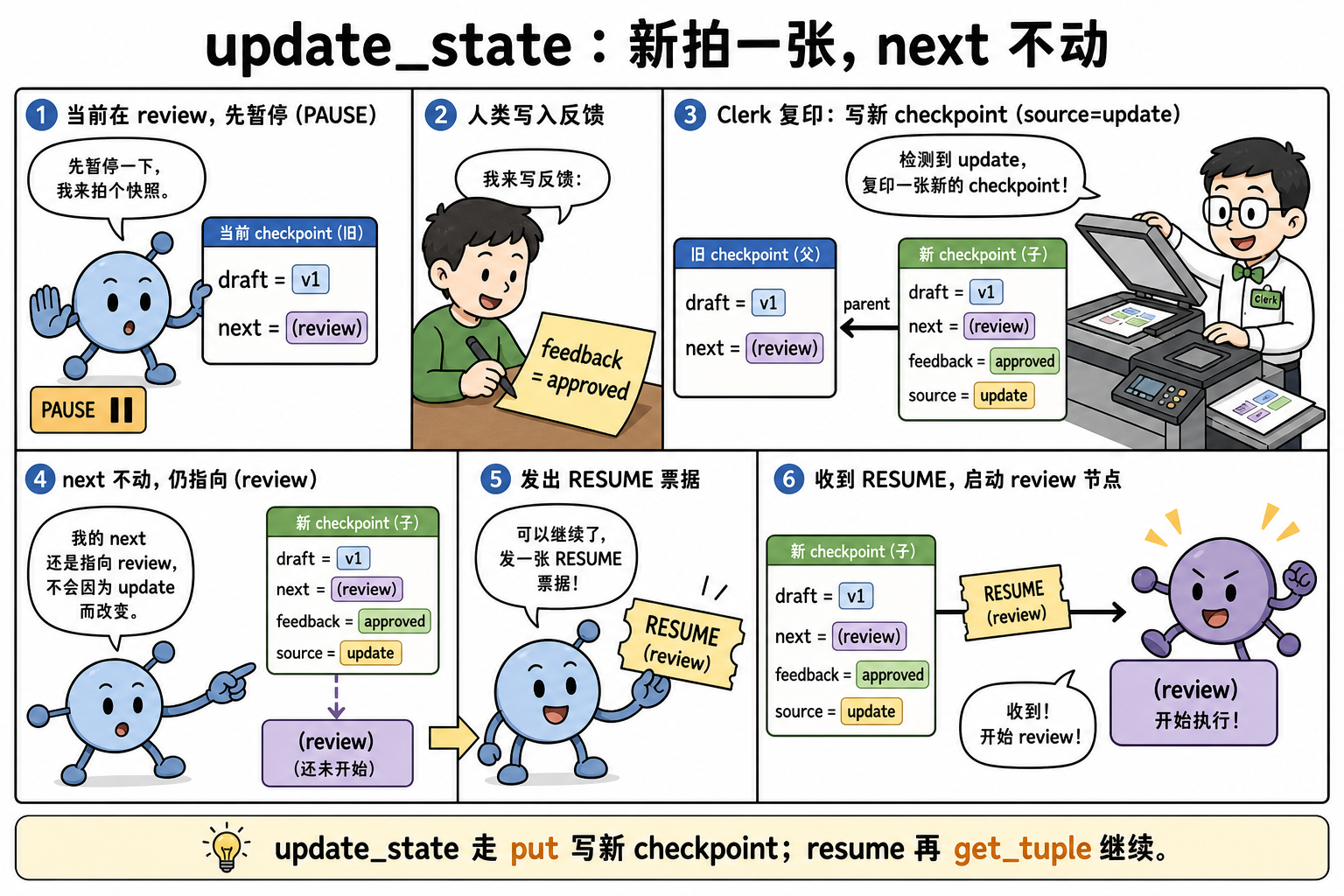
interrupt 停住之后,人可能不只想点「通过」——还要改字段(修正收件人、拒绝并写原因)。update_state 经 Saver put 再拍一枚 checkpoint(source=update,next 通常不动);Command(resume=…) 再 get_tuple 续跑。
1. 定位
| 维度 | 内容 |
|---|---|
| 角色 | 暂停态下的 state 修补与恢复 |
| 输入 → 输出 | update_state(values) / Command(resume=x) → 继续图 |
| 核心 API | graph.update_state、Command |
| 依赖 LangChain | 无 |
2. 图拓扑
节点表
| 节点名 | 职责 | 读 State | 写 State |
|---|---|---|---|
draft |
生成草稿 | — | draft |
review |
读人工意见 | draft, feedback |
final |
边表
| 源 | 目标 | 类型 |
|---|---|---|
| START | draft | 固定 |
| draft | review | 固定 |
| review | END | 固定 |
interrupt:interrupt_before=["review"]
3. invoke 生命周期
1 | 1. draft → draft="v1" |
4. 原理
4.1 update_state 如何写进 Saver
不是原地改上一枚 checkpoint,而是:
get_tuple(cfg)取出当前暂停态(含next=("review",))。- 把
values按 reducer 合并进 channels。 put新 id,metadata.source="update",parent 指向旧 id;默认 不改next。get_state(cfg)再get_tuple应看到新feedback,next仍是review。
as_node="review" 会假装这次写入来自该节点(影响后续边与 writes 归属),调试用。
4.2 resume 如何再读出来
invoke(Command(resume=...), cfg):get_tuple 加载 update 后的最新快照,从 next 继续。本篇 mock 用 state 字段 feedback 承载人工输入;Command(resume=...) 的 payload 也可经 interrupt() 注入(依版本)。
少了第 3 步的 put → resume 读不到人工改动。
第 4 步换 thread_id → 另一棵空树,暂停态丢失。
5. 最小可运行示例
1 | from typing import TypedDict |
6. 执行追踪
| 步骤 | draft |
feedback |
final |
|---|---|---|---|
| draft 后 | v1 | “” | “” |
| update_state 后 | v1 | approved-by-human | “” |
| resume 后 | v1 | approved-by-human | v1|approved-by-human |
重要配置参数
| 参数(API 名) | 类型 / 默认值 | 功能说明 | 作用与影响 | 参考起点 / 常用范围 | 配置指导 |
|---|---|---|---|---|---|
update_state(config, values) |
dict | get_tuple 后合并再 put 新 id |
默认不改 next |
feedback 字段 | 先 get_state 确认 |
Command(resume=...) |
Any | 再 invoke:get_tuple 后从 next 跑 |
须同 thread | True / dict | 与 interrupt 成对 |
get_state(config) |
snapshot | 确认 update 已落盘 | 看 values 与 next | 审批后 | 再 resume |
as_node |
str,可选 | 假装写入属于某节点 | 改 writes 归属 | 调试 | 慎用生产 |
compile(checkpointer=) |
必填 | 两步都打同一 Saver | 无则 update 失败 | InMemorySaver | 生产换 DB |
thread_id |
str | update 与 resume 同一把钥匙 | 换 ID 丢暂停态 | 不变 | 全程同一 cfg |
7. 易踩坑
- 未 update_state 直接 resume:review 读不到人工输入。
- 换 thread_id resume:找不到暂停 checkpoint。
- update_state 后改 next:需高级 API;一般只改 values。
小结
- update_state = 再
put一枚source=update的新 checkpoint,next通常不动。 - resume =
get_tuple最新快照后从next继续。 - 与 interrupt_before 组合实现可编辑 HITL。