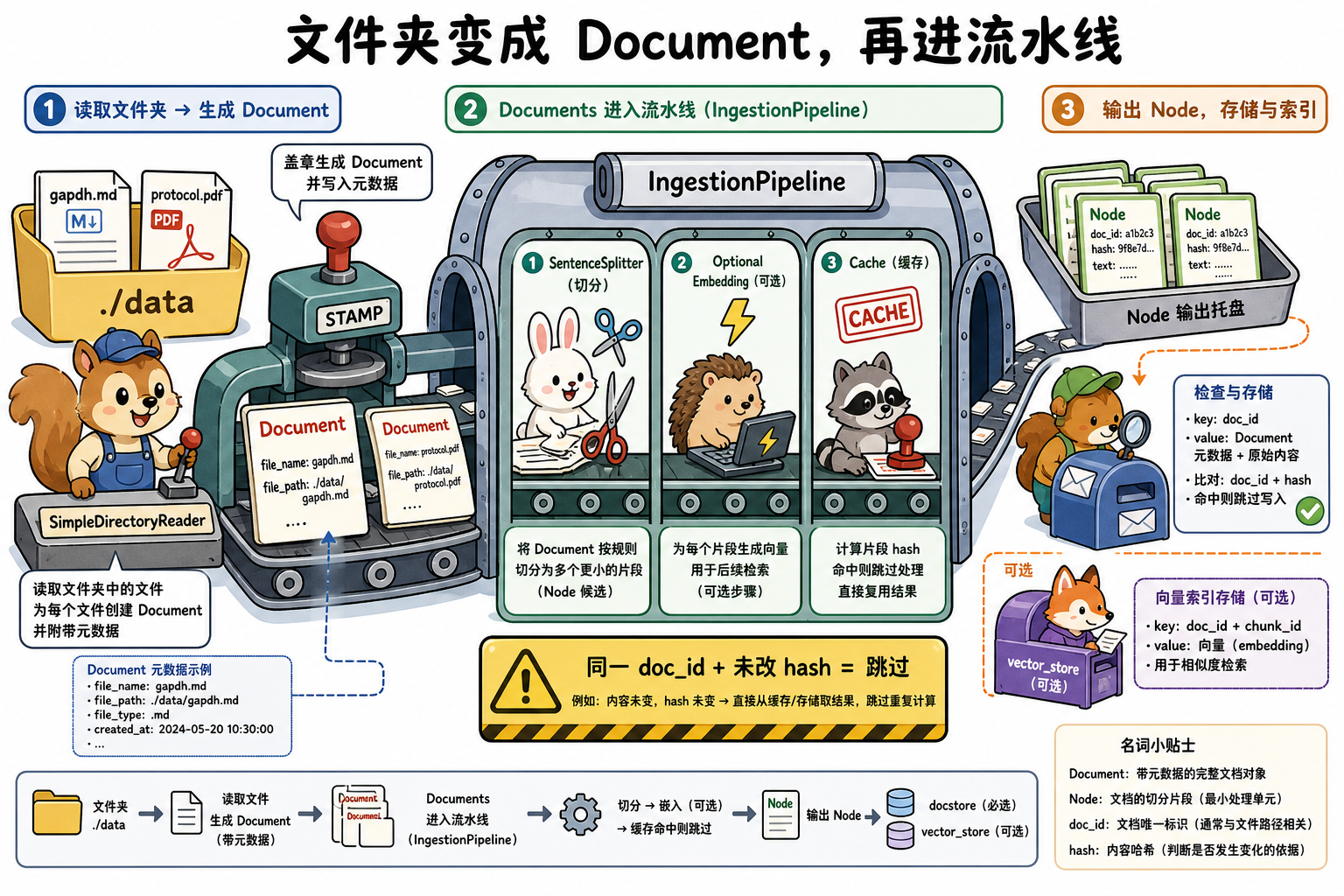
目录里已经有几十篇方法学 Markdown / PDF。每次改一篇就对整库重新切块、重新 embedding,会把迭代拖死。LlamaIndex 用 Reader(加载器)把文件变成 Document 列表;用 IngestionPipeline 把「切分、抽取、嵌入」收成可缓存的变换链——同一 Document + 同一变换的哈希命中则跳过。
段末注释:Reader 负责「磁盘/API →
list[Document]」;IngestionPipeline 负责「Document → Node(可选写入向量库)」,按「节点 + 变换」做缓存。
1. 一句话定位
| 维度 | 内容 |
|---|---|
| 角色 | 知识层的接入与离线变换:扫盘、注入文件级 metadata、增量跳过未改文档 |
| 输入 → 输出 | 目录路径 / 文件列表 → list[Document] → pipeline.run() → list[Node] |
| 典型调用入口 | SimpleDirectoryReader(...).load_data()、IngestionPipeline.run() / arun() |
| 与 LangChain / LangGraph | 近邻是 LangChain Loader;LangGraph 不跑离线入库,只在节点里消费已建好的索引 |
出现背景:单次 from_documents 适合原型。文档会改、会追加时,需要稳定 doc_id、内容哈希和变换缓存,否则每次启动都全量打 embedding 账单。
2. 前置依赖与环境
1 | pip install -U llama-index-core |
- Python 3.10+;版本锚点
llama-index-core0.14.x - 本篇示例用
.md,不依赖额外 PDF 解析包;扫描件 PDF 另装解析集成或 LlamaParse - 本篇 pipeline 不含 Embedding(避免默认打 OpenAI)。接入向量库时必须把 embed 放进
transformations
生产批量入库用 await pipeline.arun(...),参数与同步 run 一致。
3. 实现逻辑
1 | 1. 准备目录;可选 file_metadata / filename_as_id |
字段级变形:
1 | ./data/gapdh.md |
4. 原理说明
主轴是:Reader 只负责物化 Document;Pipeline 按哈希决定「这段变换要不要重做」。
1 | 1. SimpleDirectoryReader 列目录(recursive / required_exts 过滤) |
SimpleDirectoryReader(类)出现在步骤 1。功能:把目录/文件列表变成 Document。load_data() 返回 list[Document]。
file_metadata(构造参数,(str) -> dict)出现在步骤 3。功能:按路径追加业务 metadata(物种、pmid)。默认 None 时仍可能有 Reader 内置的 file_name 等键。
IngestionPipeline(类)出现在步骤 5。功能:对 Document 顺序应用 transformations。run(documents, num_workers=None) 同步;arun 异步。
IngestionCache(缓存)出现在步骤 6。本地可用 pipeline.persist(dir) / load;远程可用 Redis 等 KV。
SimpleDocumentStore(docstore)出现在步骤 7。功能:记住 doc_id → hash,支撑跳过与 upsert。
挂 vector_store 却不在 transformations 里放 Embedding:后续 VectorStoreIndex.from_vector_store 会缺向量。
5. 最小可运行示例
1 | pip install -U llama-index-core |
1 | from pathlib import Path |
第二次 n_nodes 视版本可能仍列出节点,但变换不会重做。要看缓存是否生效,对同一文件改一个字再跑,Node 的 hash / 切分结果应变化。
pipeline 落盘缓存:
1 | pipeline.persist("./pipeline_storage") |
6. 重要配置参数
| 参数(API 名) | 类型 / 默认值 | 功能说明 | 作用与影响 | 参考起点 / 常用范围 | 配置指导 |
|---|---|---|---|---|---|
input_dir |
str,必填(或 input_files) |
Reader 扫描的根目录 | 路径不存在则空列表或报错 | 项目 ./data |
用绝对路径便于 filename_as_id |
required_exts |
list[str],可选 | 只加载这些扩展名 | 不设会连图片/二进制当文本读 | [".md", ".txt"] |
明确白名单 |
recursive |
bool,默认 False |
是否进入子目录 | False 会漏 data/papers/*.md |
多层目录用 True |
与 exclude 一起用 |
filename_as_id |
bool,默认 False |
用文件路径当 doc_id |
False 则 UUID,增量管理失效 |
生产 True |
文件改名等于新文档 |
file_metadata |
callable,可选 | (path) -> dict 写入 Document.metadata |
不设则只有 Reader 内置文件键 | 返回扁平标量 | 物种、pmid 在这里打 |
transformations |
list,必填语义 | Pipeline 顺序变换 | 顺序即契约;改顺序要清 cache | 先切分,后 embedding | 接向量库时必须含 embed |
docstore |
BaseDocumentStore,可选 | 记录 doc_id → hash |
不挂则只能靠变换 cache,不能按文档 upsert | SimpleDocumentStore() |
增量入库必挂 |
num_workers |
int,run() 参数,默认空 |
多进程分批跑变换 | 过大抢 CPU/内存;过小吞吐低 | 2~8 | 先单进程跑通再开 |
cache / persist |
IngestionCache / 目录 | 保存变换结果 | 变换配置变了仍命中旧哈希会得到错切分 | 本地目录或 Redis | 改 chunk_size 后清 cache |
7. 适用 / 不适用
| 维度 | 适用 | 不适用 |
|---|---|---|
| 任务形态 | 目录型知识库、文件会追加/修订 | 单次三条字符串——直接 Document(text=...) |
| 集成约束 | 离线可扫盘;PDF 需对应 reader | 实时 API 流式正文——用自定义 Reader 或手造 Document |
| 工程阶段 | 从原型迈向「不要每次全量 embed」 | 已有外部 ETL 只往向量库写向量——可跳过 Reader |
环与 HITL 仍不在本层;Pipeline 是离线 DAG。
8. 易踩坑
filename_as_id=False却期望增量更新:每次doc_id新 UUID,docstore 认不出同一文件。- Pipeline 接了
vector_store但不做 Embedding:索引侧没有向量。 - 改了
chunk_size却不清 cache:命中旧哈希,切分看起来「没变化」。 - 直接读扫描 PDF:core 默认解析很弱,需要专用 reader / LlamaParse,否则
text是乱码或空。
小结
- Reader 把目录变成带文件 metadata 的 Document;
filename_as_id给出稳定doc_id。 - IngestionPipeline 按「节点 + 变换」哈希跳过重复劳动;文档级 upsert 还要 docstore。
- 接向量库时,Embedding 必须是变换链中的一步。
- 本篇示例不含 embed;入库与
query见 VectorStoreIndex。