用户问「比较两篇里 GAPDH 的实验对象」,一次 query() 只会检索一次。需要模型自己决定:要不要搜、搜什么、证据不够是否再搜。FunctionAgent 把函数或 QueryEngineTool 交给带 native function calling 的 LLM,在「选工具 → 执行 → 再想」之间打转,直到它认为可以回答。
段末注释:FunctionAgent 是预构建的工具循环工作流;默认两次
run之间无记忆,多轮必须传入同一个Context。
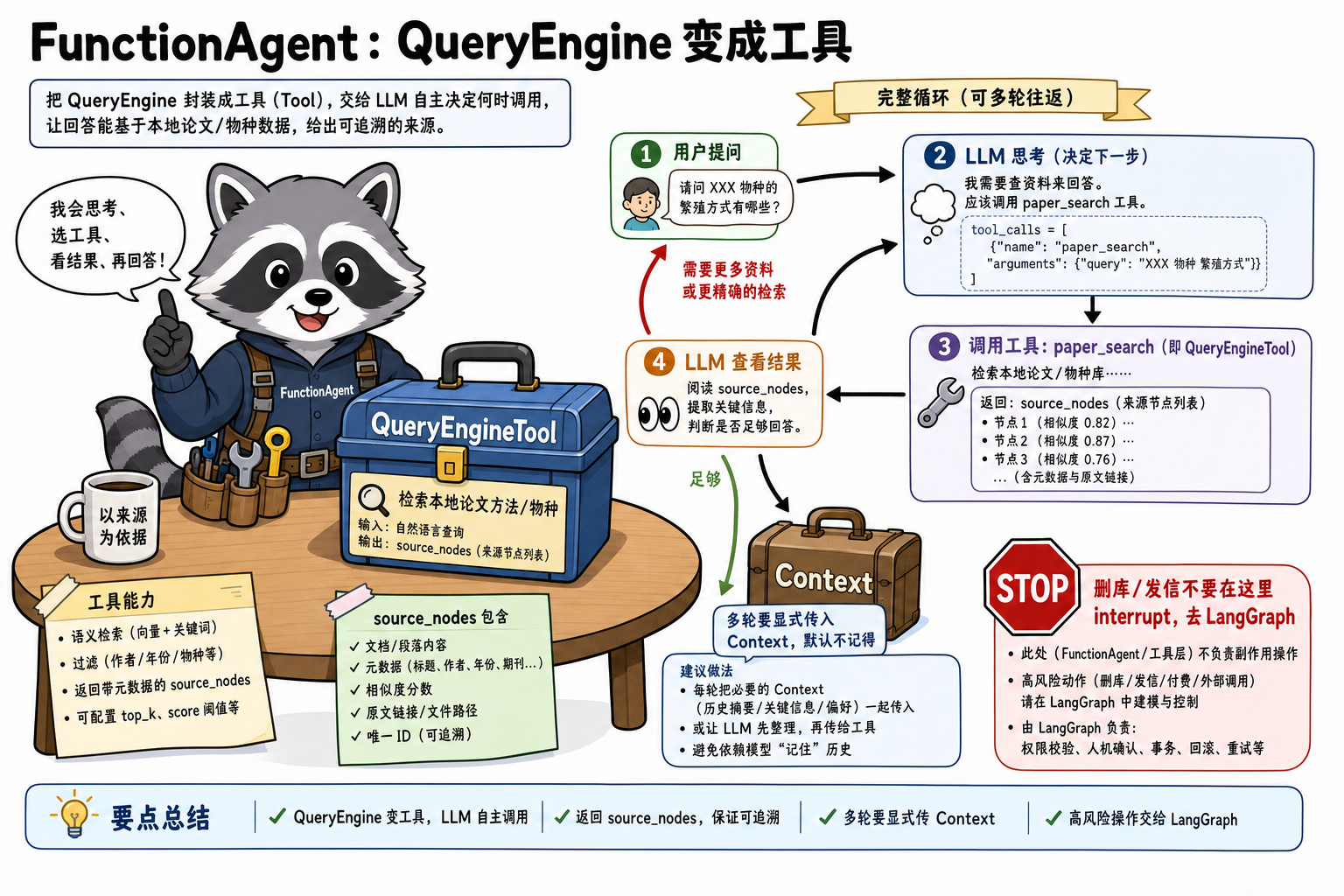
1. 一句话定位
| 维度 | 内容 |
|---|---|
| 角色 | 知识层之上的短工具环:何时调用检索/计算由模型决定 |
| 输入 → 输出 | user_msg: str → 终态文本(工具中间结果在事件流里) |
| 典型调用入口 | FunctionAgent(...).run()、QueryEngineTool.from_defaults()、Context(agent) |
| 与 LangChain / LangGraph | 近邻是 create_agent;checkpoint / interrupt / 持久化线程仍用 LangGraph |
出现背景:QueryEngine 是 DAG。Agent 把「再检索」从你写的 if 变成模型的 tool_calls。本地小模型 tool calling 不稳时,改 ReActAgent(纯文本 ReAct),不要假装 FunctionAgent 万能。
2. 前置依赖与环境
1 | pip install -U llama-index-core llama-index-llms-ollama llama-index-embeddings-ollama |
- 必须设
Settings.embed_model(工具里的 QueryEngine 要检索)与 Agent 的llm run是 async;脚本里asyncio.run- 生产服务用
await agent.run(...),不要在事件循环里再asyncio.run
3. 实现逻辑
1 | 1. 建 Index / QueryEngine(DAG 检索+合成) |
字段级变形:
1 | user_msg = "实验对象是什么物种?" |
工具 description 决定会不会被选中,和 Router 的 description 同一类契约。
4. 原理说明
主轴是:Agent 循环改的是消息列表;QueryEngine 每次被调用都是一次独立 DAG。
1 | 1. run(user_msg) 若未传 ctx,内部新建空 Context |
QueryEngineTool.from_defaults 出现在步骤 2。name 须合法函数名;description 写清检索范围。return_direct=True 时工具输出直接当终态,不再让模型改写(引用格式可能更稳、也更生硬)。
FunctionAgent 出现在步骤 3。tools 可混:裸函数(靠 docstring + 类型注解)与 Tool 对象。
Context 出现在步骤 8。它是 Workflow 的运行时状态,不是 LangGraph checkpointer:进程退出即失。
步数失控、要审批、要落盘:把本 Agent 当 LangGraph 一个节点,或直接在图里调 QE,不要在 FunctionAgent 里模拟 interrupt。
5. 最小可运行示例
1 | pip install -U llama-index-core llama-index-llms-ollama llama-index-embeddings-ollama |
1 | import asyncio |
无 native tools 的模型:
1 | from llama_index.core.agent.workflow import ReActAgent |
6. 重要配置参数
| 参数(API 名) | 类型 / 默认值 | 功能说明 | 作用与影响 | 参考起点 / 常用范围 | 配置指导 |
|---|---|---|---|---|---|
tools |
list | 可调用函数/Tool | 空列表则纯聊天,检索不会发生 | 1~5 个起步 | description 必须互斥、可执行 |
system_prompt |
str | 角色与拒答策略 | 不写「无证据则不知道」易编造 | 短约束 + 工具职责 | 与 tool description 分工 |
llm |
LLM | 负责 tool_calls | 不支持 function calling 则空转或乱参 | 明确支持 tools 的模型 | 失败改 ReActAgent |
ctx |
Context,可选 | 跨 run 的消息/状态 | 不传 = 每轮失忆 | 多轮会话必传 | 生产要持久化请换 LangGraph |
return_direct |
bool,Tool 上默认 False | 工具输出是否跳过模型改写 | True 保真引用、少一次 LLM | 强引用场景 True | FAQ 可开,比较题关掉 |
streaming |
bool,Agent 上 | 是否流式事件 | 部分本地模型需 False |
先 False 跑通 | 前端再开 |
timeout |
Workflow 秒数 | 整段循环上限 | 过短误杀再检索;过长空转烧钱 | 60~180 | 与工具 HTTP 超时分开设 |
7. 适用 / 不适用
| 维度 | 适用 | 不适用 |
|---|---|---|
| 任务形态 | 要不要检索不确定、可能二次检索 | 固定「每次都检索一次」——QueryEngine 更便宜可测 |
| 集成约束 | LLM 支持 tool calling | 高风险动作要人批——LangGraph interrupt |
| 工程阶段 | 原型多工具 | 进程重启续跑——checkpointer,不是 Context |
8. 易踩坑
- 两次
run不传 Context:多轮断裂。 - tool description 写成「很有用」:从不检索或乱检索。
- 终态字符串里找不到 source_nodes:模型改写时丢掉;需要引用就
return_direct或自己在工具里格式化 citation。 - 用 FunctionAgent 模拟审批:没有
thread_id级恢复。
小结
- FunctionAgent = 短工具环;QueryEngine 仍是被调用的 DAG。
- 多轮必须 同一 Context。
- 引用要在 Tool 层钉死,不要指望终态文本自动带
source_nodes。 - 环要持久化、要 HITL → LangGraph。