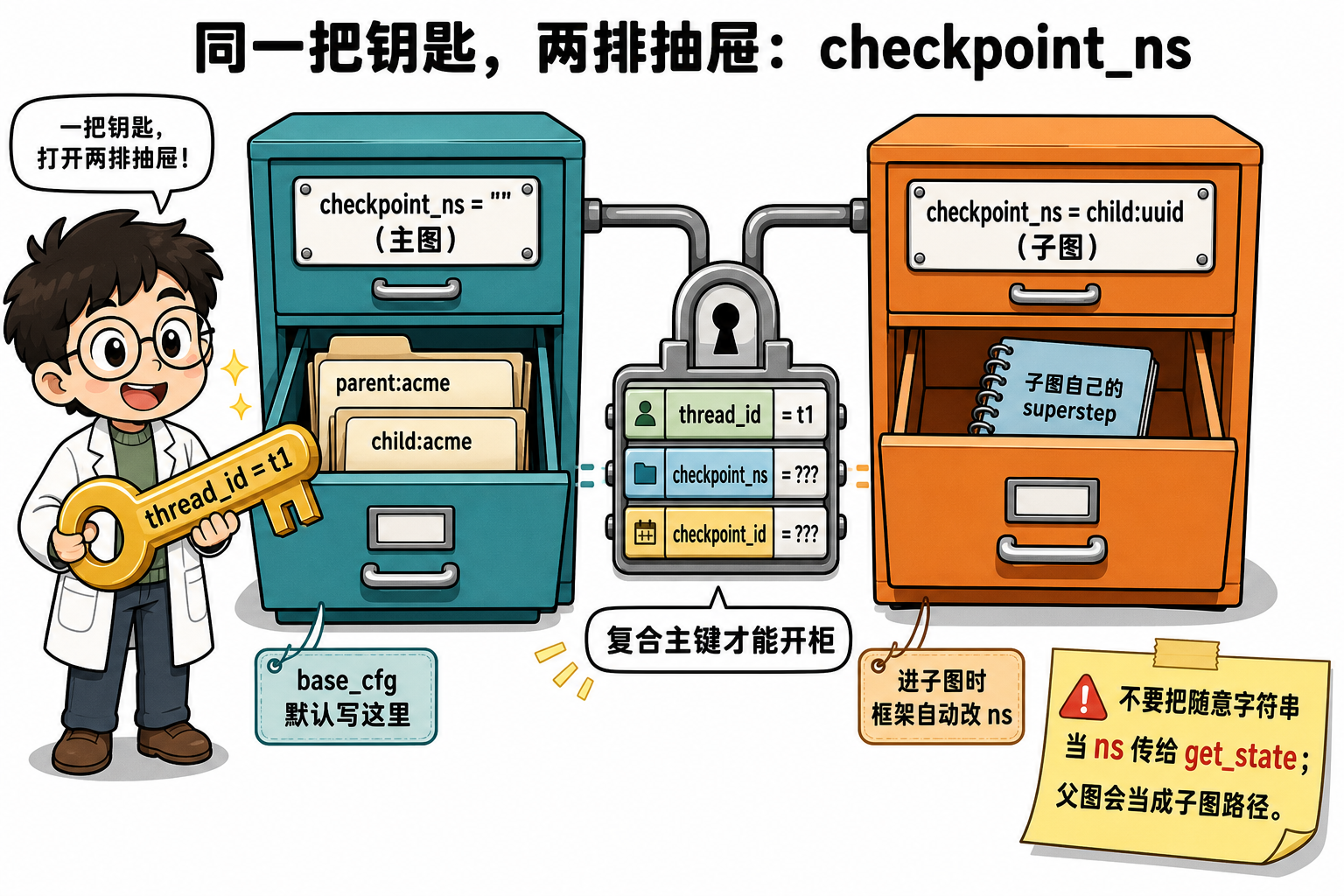
同一 thread_id 下嵌套 Subgraph 时,检查点还要再分一层空间,避免主图与子图的 superstep 快照串线。这一层键就是检查点命名空间(checkpoint namespace,checkpoint_ns),写在 config["configurable"] 里,和 thread_id 一起交给 checkpointer。
段末注释:checkpoint_ns = 同一会话内再切「哪张图」的快照抽屉;主图默认空串
"",进子图时由框架改写成节点名:task_id。
社区方案:用官方 Checkpointers 的 (thread_id, checkpoint_ns, checkpoint_id) 主键,不要自研第二套分区。风险:父图上的 get_state / get_state_history 见到非空 ns 会先按子图路径路由;手搓字符串当租户键会报 Subgraph … not found。
1. 定位
| 维度 | 内容 |
|---|---|
| 角色 | compile 产物 API + checkpoint 逻辑分区 |
| 输入 → 输出 | configurable.checkpoint_ns → 读写对应 ns 快照 |
| 核心 API | compile、invoke / stream、get_state、checkpoint_ns |
| 依赖 LangChain | Runnable 接口(invoke / stream / batch) |
出现背景:只配 thread_id 只能隔离会话;子图与主图共用同一 thread 时,必须再靠 ns 把各自 superstep 快照拆开。
2. 图拓扑
节点表
| 节点名 | 职责 | 读 State | 写 State |
|---|---|---|---|
parent |
主图写 tenant | tenant |
log |
child |
子流程 mock | tenant |
log |
边表
| 源 | 目标 | 类型 |
|---|---|---|
| START | parent | 固定 |
| parent | child | 固定 |
| child | END | 固定 |
本篇先用普通节点看 base_cfg 的 ns 如何锁定主图抽屉;§5 后半再挂真正的 Subgraph,看框架如何自动改写 ns。
3. invoke 生命周期
1 | 1. StateGraph.compile(checkpointer=cp) → CompiledStateGraph |
省略 checkpoint_ns 与显式 "" 等价,都落主图抽屉。
4. 原理
4.1 compile 产物与方法
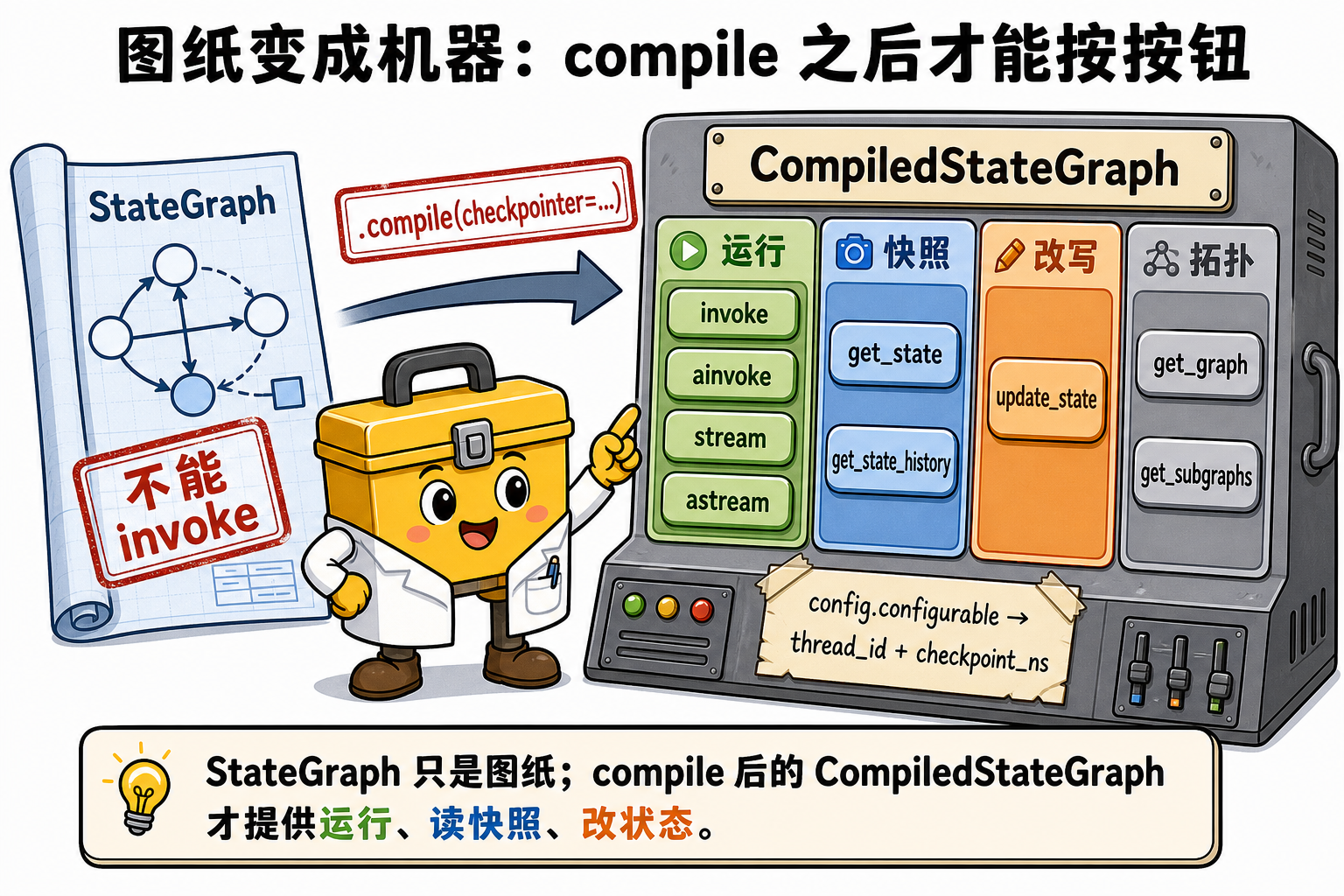
StateGraph(State) 只是图纸,不能跑。compile(...) 返回 CompiledStateGraph(底层 Pregel,并实现 LangChain Runnable)。
| 分组 | 方法 | 是否吃 config.ns | 做什么 |
|---|---|---|---|
| 运行 | invoke / ainvoke |
是 | 同步 / 异步跑完全图,返回终态 |
| 运行 | stream / astream |
是 | 按 stream_mode 推事件 |
| 运行 | stream_events / astream_events |
是 | LCEL 风格事件流 |
| 快照 | get_state / aget_state |
是 | 读该 (thread_id, ns) 最新(或指定 checkpoint_id)快照 |
| 快照 | get_state_history / aget_state_history |
是 | 按 ns 列历史,新→旧 |
| 改写 | update_state / aupdate_state |
是 | 把 values 合并进该 ns 当前 checkpoint |
| 改写 | bulk_update_state / abulk_update_state |
是 | 批量 / 多步补丁 |
| 拓扑 | get_graph / get_subgraphs |
否 | 画图、枚举已注册子图 |
| 契约 | get_input_schema / get_output_schema 及 *jsonschema |
否 | 输入输出 schema |
| 其它 | with_config / copy / clear_cache |
视用法 | 预置 config、清节点缓存 |
未传 checkpointer 时,运行类方法仍可用;快照 / 改写类会 ValueError: No checkpointer set。batch / abatch 来自 Runnable,本篇不展开。
base_cfg 只对「吃 config」的那一组生效:运行、快照、改写都把同一份 configurable 传给 checkpointer。
4.2 一次 invoke 里 ns 怎么参与
复合主键是 (thread_id, checkpoint_ns, checkpoint_id)。InMemorySaver 把三本账嵌成:
1 | storage[thread_id][checkpoint_ns][checkpoint_id] = (checkpoint, metadata, parent_id) |
图仍只打 get_tuple / put,不直接翻这些 dict。SQL 实现则是两张表同一三维:
1 | PRIMARY KEY (thread_id, checkpoint_ns, checkpoint_id) |
base_cfg 通常长这样:
1 | base_cfg = {"configurable": {"thread_id": "t1", "checkpoint_ns": ""}} |
挂在链路上:
compile(checkpointer=cp)把 Saver 绑到 CompiledStateGraph。invoke(input, base_cfg)(或stream)取出thread_id="t1"、checkpoint_ns=""。没写 ns 时运行时补""。- 调度前
cp.get_tuple(base_cfg):无checkpoint_id则WHERE thread_id='t1' AND checkpoint_ns='' ORDER BY checkpoint_id DESC LIMIT 1。命中则 channels 灌入上次 state;未命中从本次 input 起。 - 节点返回 partial update,reducer 合并(本篇
log走operator.add)。 - 每个 superstep 结束
cp.put(...)仍写到(t1, ""),并生成新的checkpoint_id。put_writes的 pending writes 也挂在同一三维上。 get_state(base_cfg)再走第 3 步的get_tuple,包装成StateSnapshot(values/next/config/metadata)。config里会回填实际用过的thread_id、checkpoint_ns、checkpoint_id。
少了第 2 步的 thread_id → checkpointer 无法定位行。
少了第 3 步按 ns 过滤 → 主图会读到子图快照,或反过来。
第 6 步若把 ns 改成另一个字符串 → 读的是另一只抽屉,不是「同一份 state 的别名」。
4.3 子图如何自动改写 ns
进入已 compile 的子图节点时,框架不沿用调用方手写的自定义 ns,而是拼任务级命名空间:
1 | parent_ns 为空: {节点名}:{task_id} |
分隔符:层级用 |,节点与 task 用 :。嵌套两层形如 outer:uuid|inner:uuid。节点内可读:
1 | def my_node(state, config): |
子图 compile(checkpointer=None) 时继承父图 Saver,只是 ns 不同;checkpointer=True 则子图自管历史;False 关闭子图落盘。
调试已注册子图:
1 | snap = graph.get_state(base_cfg, subgraphs=True) |
4.4 父图 get_state 对非空 ns 的路由
get_state / get_state_history 在父图上若看到非空 checkpoint_ns,且 config 里没有注入内部 checkpointer 键,会先 recast_checkpoint_ns(去掉 :task_id)再 get_subgraphs(namespace=...):
| 传入 ns | 行为 |
|---|---|
"" 或省略 |
读主图抽屉 |
child:<task_id> 且存在子图 child |
委派给该子图的 get_state |
"sub-demo" 等未注册名 |
ValueError: Subgraph sub-demo not found |
因此:多租户用 thread_id(如 org:user),不要用 checkpoint_ns 当租户键。 手搓 ns 既不会自动建抽屉,也会让快照 API 走错路由。
5. 最小可运行示例
1 | import operator |
子图自动 ns(同一 thread,另一只抽屉):
1 | sub = StateGraph(State) |
6. 执行追踪
| 操作 | ns | log / 结果 |
|---|---|---|
invoke(..., base_cfg) |
"" |
["parent:acme", "child:acme:ns=''"] |
get_state(base_cfg) |
"" |
同上 |
get_state({thread_id: t1}) |
默认 "" |
与上一行同一抽屉 |
get_state(ns="sub-demo") |
手搓 | Subgraph sub-demo not found |
| 子图节点内读 config | sub:<task_id> |
child 那一行带该 ns |
重要配置参数
| 参数(API 名) | 类型 / 默认值 | 功能说明 | 作用与影响 | 参考起点 / 常用范围 | 配置指导 |
|---|---|---|---|---|---|
compile(checkpointer=...) |
Saver / None |
生成 CompiledStateGraph 并绑短时记忆 | 不传则无法 get_state |
InMemorySaver | 生产换 Sqlite/Postgres |
configurable.thread_id |
str,必填(有 cp 时) | 会话主键第一维 | 换 ID = 新会话 | UUID / org:user |
多租户只改这一维 |
configurable.checkpoint_ns |
str,默认 "" |
会话内图级分区 | 读写都按这维过滤 | 主图空串 | 子图交给框架 |
configurable.checkpoint_id |
str,可选 | 定点快照 | 不传则取该 ns 最新 | 时间旅行 | 与 ns 同时匹配 |
invoke / stream |
(input, config) |
按 ns 加载再写入 | 写到 config 指定的抽屉 | 多轮续跑 | 主图用 base_cfg |
get_state(config, subgraphs=False) |
→ StateSnapshot |
读最新快照;非空 ns 先路由子图 | 错 ns 读空或抛错 | 调试子图 | 嵌套用 subgraphs=True |
get_state_history(config) |
迭代器 | 只列该 ns 的历史 | 不会跨 ns 混排 | 回溯 | 先对准 ns |
update_state(config, values) |
→ 新 config | 补丁写进该 ns | 写错 ns 改不到主图 | HITL | 与 resume 同 cfg |
Subgraph compile(checkpointer=) |
None / True / False |
是否自管子图历史 | None 继承父 Saver+独立 ns |
嵌套图 | 默认 None |
7. 易踩坑
- 把
checkpoint_ns当租户 ID:父图get_state会当子图路径;租户隔离用thread_id。 get_state未设 ns 却查子图:默认读主图"";要用subgraphs=True或 snapshot 回填的真实 ns。- 混淆 checkpoint_ns 与 Store namespace:Store 是跨 thread 长期记忆,不是 checkpoint 主键。
- 在
StateSnapshot上读.configurable:字段是.config["configurable"]。
小结
compile之后才有invoke/stream/get_state/update_state等方法;快照类必须带 checkpointer。base_cfg["configurable"]["checkpoint_ns"]是复合主键的一维:invoke 读写、get_state 读取,都只碰这一只抽屉。- 主图用
"";子图 ns 由框架写成节点名:task_id。不要手搓 ns 做多租户。