你已经知道 Agent 要「模型 + 工具 + 循环 + 记忆」,缺的是 LangChain 把这些步骤封成了哪个类、哪个方法。本文按「我要做 X → 调哪个函数」组织,不展开原理。社区方案即官方 langchain / langchain-core(v1);风险是包路径随版本漂移,以及 2024 年前的 LLMChain / AgentExecutor 在 v1 主包里已经不在。
段末注释:LangChain = Python 包生态(
langchain、langchain-core及langchain-*集成),本系列指 能力层;带环、检查点、审批的编排见 LangGraph。
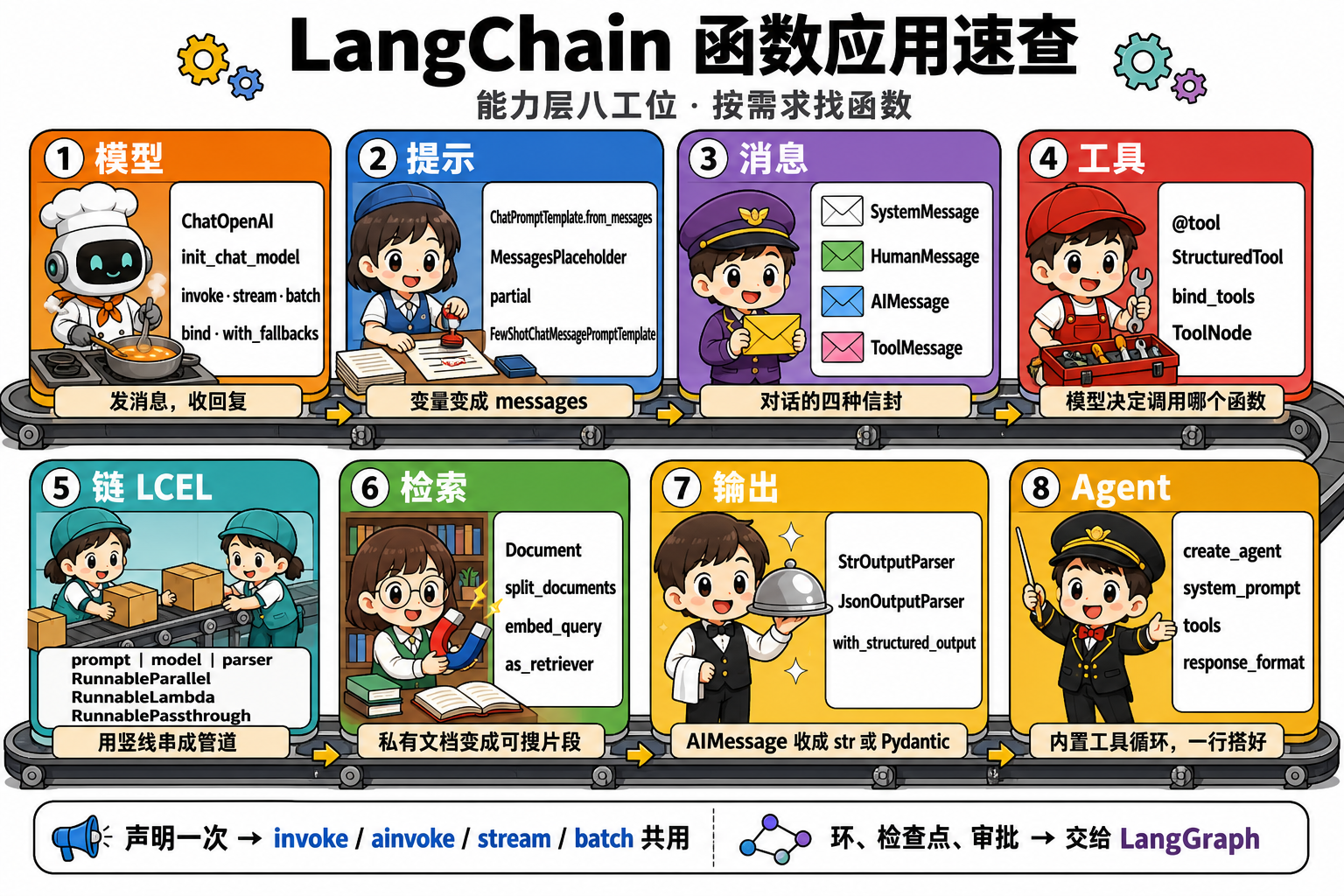
1. 一句话定位
| 维度 | 内容 |
|---|---|
| 角色 | 能力层 API 柜台:需求 → 类/函数 → 输入输出 |
| 输入 → 输出 | 你的任务描述 → 可复制的 import 与一行调用 |
| 典型入口 | invoke / ainvoke / create_agent / bind_tools / with_structured_output |
| 与 LangGraph | 线性链与标准工具循环用本表;thread_id、interrupt、自定义图不在本表 |
版本锚点:写法对齐 langchain 1.3.x / langchain-core 1.5.x。旧 import 见 §6。
2. 我要做 X → 用哪个
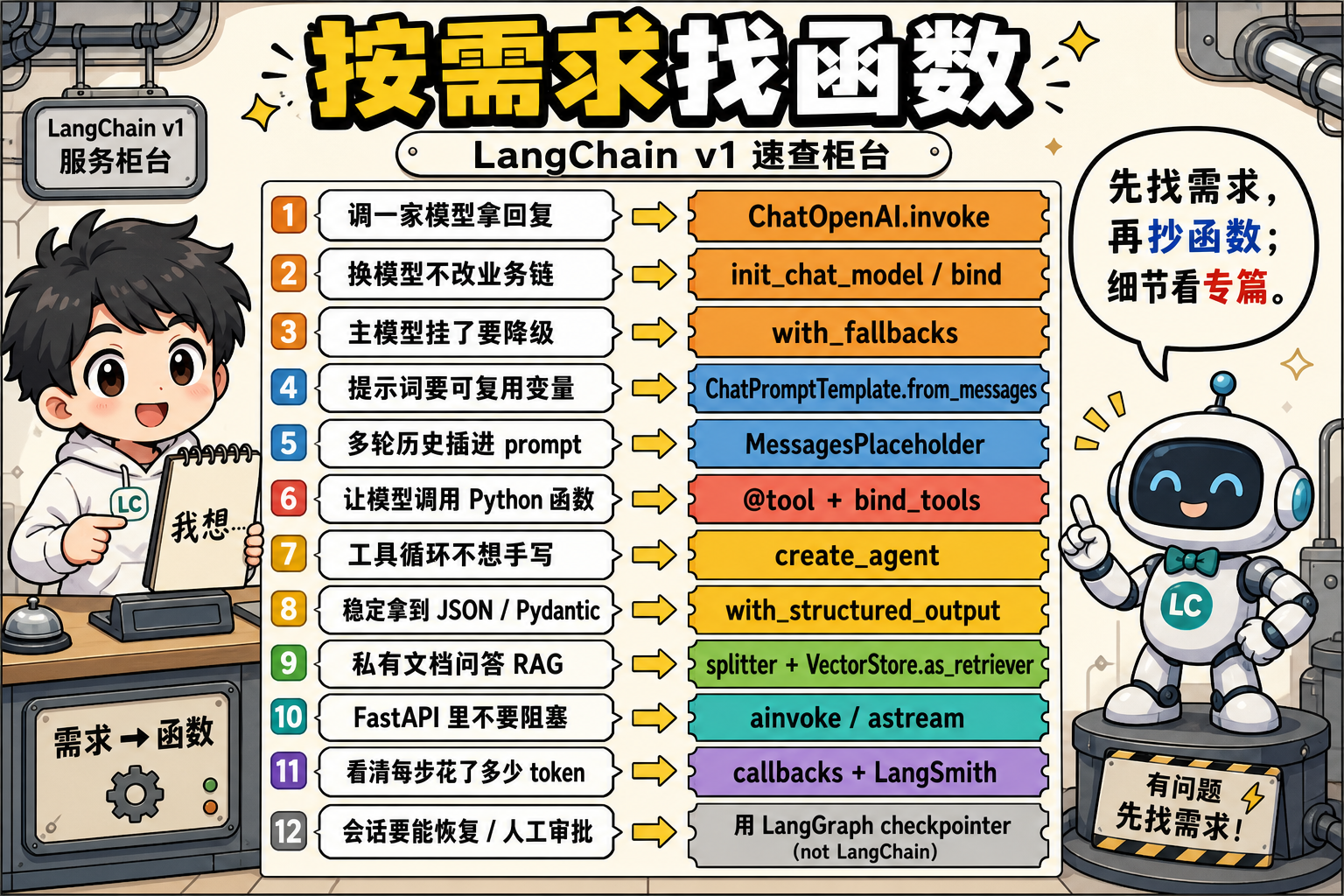
先读左列,再抄右列。图 2 是同一张表的漫画版。
| 我要做的事 | 用这个 | 不要误用 |
|---|---|---|
| 调一家 Chat 模型拿回复 | ChatOpenAI / init_chat_model + .invoke(messages) |
直接调厂商 SDK 再自己拼 role |
| 换模型、不改后面的链 | init_chat_model("openai:...") 或 model.bind(...) |
每处硬编码一个厂商类 |
| 主模型超时 / 限流要降级 | primary.with_fallbacks([backup]) |
手写多层 try/except 换实例 |
| 同一调用自动重试 | runnable.with_retry(stop_after_attempt=3) |
与 fallback 混成一团分不清 |
| 提示词要变量、可测 | ChatPromptTemplate.from_messages |
f-string 拼 system |
| 部分变量先写死 | prompt.partial(lang="中文") |
每次 invoke 重复传常量 |
| 多轮历史插进模板 | MessagesPlaceholder("history") |
把 history 拼进一个大字符串 |
| 给模型看几条示范 | FewShotChatMessagePromptTemplate |
把示例写进 system 长文 |
| 拼一条合法对话 | SystemMessage / HumanMessage / AIMessage / ToolMessage |
手写 {"role":"user"} 当主路径 |
| 工具结果回填 | ToolMessage(content=..., tool_call_id=...) |
漏 tool_call_id |
| 把 Python 函数暴露给模型 | @tool 或 StructuredTool.from_function |
只在 prompt 里写「请调用 xxx」 |
| 让模型发出 tool_calls | model.bind_tools([t1, t2]) |
绑了工具却去读 content 当终态 |
| 执行 tool_calls 并回填 | 手写循环,或 ToolNode / create_agent |
bind_tools 之后以为已经执行了 |
| 标准 ReAct 工具循环 | create_agent(model, tools, system_prompt=...) |
新代码仍用 create_react_agent / AgentExecutor |
| 线性流水线(prompt→模型→解析) | chain = prompt | model | parser |
嵌套 parser.parse(model.invoke(...)) |
| 同一输入扇出多路 | RunnableParallel(或 dict 字面量进链) |
串行跑两遍独立 I/O |
| 在链里插一段 Python | RunnableLambda(func) |
把业务 if/else 全塞进 Lambda 当编排 |
| 原样往下传 | RunnablePassthrough() |
为了「占位」再写一个恒等函数 |
| 条件分支(无环) | RunnableBranch |
有环仍用 Branch |
| 文本变向量 | embed_query / embed_documents |
query 与 document 用不同 Embedding 模型 |
| 切长文档 | RecursiveCharacterTextSplitter.split_documents |
按固定字符硬切、丢掉标题结构 |
| 建向量库并检索 | VectorStore.from_documents → as_retriever / similarity_search |
把 list[Document] 当 str 塞 prompt |
| 只要模型正文 | StrOutputParser |
下游要字段时仍用 Str |
| 稳定拿到 Pydantic / JSON | model.with_structured_output(Schema) |
只在 prompt 里写「请输出 JSON」 |
| 轻量抠一段 JSON | JsonOutputParser |
当强 schema 的第一选择 |
| 多轮记忆(新项目) | LangGraph checkpointer + thread_id |
新项目继续包 RunnableWithMessageHistory |
| 进程内临时记几轮 | InMemoryChatMessageHistory.add_message |
当持久化会话用 |
| FastAPI / 高并发 | ainvoke / astream / abatch |
在事件循环里调同步 invoke |
| 看中间步骤与 token | config={"callbacks":[...]} 或 LangSmith |
只 print 最终字符串 |
| 同链换模型 / 加 tags | invoke(x, config={...}) / with_config / configurable_fields |
把租户、模型名写进构造器 |
3. 万能入口:Runnable 六兄弟
几乎所有组件都实现 Runnable(可组合单元)协议。声明一次,六种跑法共用:
| 方法 | 同步 / 异步 | 输入 | 输出 | 什么时候用 |
|---|---|---|---|---|
invoke(x) |
同步 | 单条 | 单条完整结果 | 脚本、笔记本 |
ainvoke(x) |
异步 | 单条 | 单条完整结果 | FastAPI、asyncio |
stream(x) |
同步生成器 | 单条 | chunk | 打字机式输出 |
astream(x) |
异步生成器 | 单条 | chunk | 异步流式 |
batch([x, ...]) |
同步 | 多条 | 列表 | 离线批处理 |
abatch([x, ...]) |
异步 | 多条 | 列表 | 异步批量 |
astream_events(..., version="v2") 用来拿逐步事件(on_chat_model_stream 等),不是日常默认入口。
1 | # 输入:业务 dict 或 messages;输出:链尾类型(str / AIMessage / 结构化对象) |
4. 按模块的函数卡
每张卡只记 import、输入→输出、一行用法。参数细节以对应专篇为准。
4.1 模型
| 函数 / 类 | import | 输入 → 输出 | 一行用法 |
|---|---|---|---|
ChatOpenAI(...) |
langchain_openai |
构造器 → ChatModel | ChatOpenAI(model="qwen3.5:9b", api_key="ollama", base_url="http://localhost:11434/v1") |
init_chat_model(id) |
langchain.chat_models |
"openai:gpt-4o-mini" → ChatModel |
换厂商只改字符串 |
invoke(messages) |
挂在 ChatModel | str 或 list[BaseMessage] → AIMessage |
model.invoke([HumanMessage("hi")]) |
bind(**kwargs) |
同上 | 返回新 Runnable | model.bind(temperature=0) |
bind_tools(tools) |
同上 | 返回会发 tool_calls 的模型 |
model.bind_tools([search]) |
with_structured_output(Schema) |
同上 | messages → Pydantic / dict | model.with_structured_output(Answer) |
with_fallbacks([b]) |
Runnable | 与主路径同 I/O | primary.with_fallbacks([backup]) |
with_retry(...) |
Runnable | 与主路径同 I/O | model.with_retry(stop_after_attempt=3) |
embed_query(text) |
Embeddings | str → list[float] |
检索问句编码 |
embed_documents(texts) |
Embeddings | list[str] → list[list[float]] |
建库批量编码 |
invoke("问句") 只包成 HumanMessage,不会自动带 SystemMessage。
4.2 提示词
| 函数 / 类 | import | 输入 → 输出 | 一行用法 |
|---|---|---|---|
ChatPromptTemplate.from_messages |
langchain_core.prompts |
(role, tpl) 列表 → 模板 |
from_messages([("system","..."),("human","{q}")]) |
PromptTemplate.from_template |
同上 | 单字符串模板 | completion 型 LLM 才用 |
MessagesPlaceholder(name) |
同上 | 插入 list[BaseMessage] |
MessagesPlaceholder("history") |
partial(**kwargs) |
挂在模板 | 预填变量 → 新模板 | prompt.partial(lang="中文") |
FewShotChatMessagePromptTemplate |
同上 | 示例 + 当前输入 → 含示范的 messages | 分类 / 固定格式 |
SemanticSimilarityExampleSelector |
langchain_core.example_selectors |
按向量相似度抽示例 | 示例库大时用 |
invoke 的 dict 键必须覆盖全部未 partial 的 {占位符},少一个即 KeyError。
4.3 消息
| 类型 / 函数 | 角色 | 必填字段 | 典型用途 |
|---|---|---|---|
SystemMessage |
system | content |
角色与约束,通常放列表首位 |
HumanMessage |
human | content |
用户输入 |
AIMessage |
ai | content(工具轮可为 "") |
模型回复;看 tool_calls |
ToolMessage |
tool | content + tool_call_id |
回填工具结果 |
RemoveMessage |
— | id |
从图 state 删一条消息 |
AIMessageChunk |
ai | 流式增量 | stream 的每一片 |
message_to_dict / messages_from_dict |
— | 1 条或 list | 落盘 / 恢复 |
AIMessage.tool_calls 每项至少 {name, args, id}。并行工具:len(tool_calls) ≥ 2 时回填 等量 ToolMessage。FunctionMessage 是 legacy,新代码不用。
4.4 工具
| 函数 / 类 | import | 输入 → 输出 | 一行用法 |
|---|---|---|---|
@tool |
langchain_core.tools |
Python 函数 → StructuredTool |
docstring 不能空(模型靠它选工具) |
StructuredTool.from_function |
同上 | 函数 + 可选 schema | 复杂参数显式 args_schema |
tool.invoke(args) |
挂在 Tool | dict → 工具返回值 |
search.invoke({"query": "北京"}) |
model.bind_tools(tools) |
ChatModel | 把 schema 写入请求 | 只解决「模型会不会叫」,不执行 |
ToolNode(tools) |
langgraph.prebuilt |
{messages:[AIMessage]} → 追加 ToolMessage |
create_agent 内部也用它 |
1 | from langchain_core.tools import tool |
4.5 链(LCEL)
LCEL(LangChain Expression Language)用 | 连接 Runnable:左输出 = 右输入。
段末注释:LCEL = 用
|声明数据依赖的链式语法;组合成的仍是 Runnable。
| 函数 / 类 | 做什么 | 一行用法 |
|---|---|---|
a | b | c |
串成 RunnableSequence |
prompt | model | StrOutputParser() |
RunnableParallel(...) |
扇出,输出 dict | {"ctx": retriever, "q": RunnablePassthrough()} |
RunnablePassthrough() |
原样返回输入 | 与 Parallel 搭配保留原问题 |
RunnableLambda(func) |
包装任意 callable | RunnableLambda(format_docs) |
RunnableBranch |
条件选一条支路 | ≥1 个条件 + 1 个 default;无环 |
with_config(...) |
预置 tags / metadata | 与单次 invoke(..., config=) 合并 |
4.6 检索(RAG 能力层)
| 函数 / 类 | import | 输入 → 输出 | 一行用法 |
|---|---|---|---|
Document(page_content, metadata) |
langchain_core.documents |
文本 + 元数据 | RAG 的原子对象 |
RecursiveCharacterTextSplitter |
langchain_text_splitters |
长文 → chunks | chunk_size / chunk_overlap |
split_text / split_documents |
挂在 splitter | str / list[Document] → chunks |
建库前必切 |
MarkdownHeaderTextSplitter |
同上 | 按标题切 | 保留标题进 metadata |
from_documents(docs, embedding) |
VectorStore 类方法 | 文档 + Embedding → 库 | InMemoryVectorStore.from_documents |
add_documents / add_texts |
VectorStore | 增量写入 | 已有库后续追加 |
similarity_search(q, k=4) |
VectorStore | 问句 → list[Document] |
直接查,不进 LCEL |
as_retriever(search_kwargs={"k":4}) |
VectorStore | 库 → Retriever | 才能 | 进链 |
retriever.invoke(query) |
Retriever | str → list[Document] |
不是 str,要自己 format_docs |
format_docs 是应用层函数,不是框架类:把 page_content 拼成一段再进 prompt。
4.7 输出
| 函数 / 类 | 输入 → 输出 | 何时用 |
|---|---|---|
StrOutputParser() |
AIMessage → str |
只要正文 |
JsonOutputParser() |
AIMessage → dict |
轻量 JSON;非 JSON 会抛错 |
with_structured_output(Schema) |
messages → Pydantic / dict | 强 schema 首选(走厂商 structured API) |
PydanticOutputParser |
字符串抠字段 | v1 兜底;新代码优先上一行 |
create_agent(..., response_format=Schema) |
Agent state 带 structured_response |
工具循环结束时要结构化对象 |
Parser 在链尾从文本抠;with_structured_output 在模型层约束。两者不要叠两层抢同一 schema。
4.8 Agent
| 函数 / 参数 | import | 作用 |
|---|---|---|
create_agent(model, tools, system_prompt=...) |
langchain.agents |
v1 标准工厂;内部 LangGraph + ToolNode |
model |
str 或 ChatModel | "openai:gpt-4o-mini" 或实例 |
tools |
list | 有工具任务时 len ≥ 1;也可直接传函数 |
system_prompt |
str / None | 短指令;不要再传旧名 prompt= |
response_format |
BaseModel / Strategy | 结构化结束条件 |
agent.invoke({"messages": [...]}) |
挂在返回图 | 输入 messages len ≥ 1;输出完整 messages |
config={"recursion_limit": 25} |
RunnableConfig | 防死循环;有意义下限 ≈ 工具轮次 × 2 |
1 | from langchain.agents import create_agent |
需要 checkpoint / interrupt / 多节点审批时,不要继续加 create_agent 参数硬撑,改用 LangGraph。
4.9 记忆 / 配置 / 观测
| 函数 / 类 | 状态 | 用法 |
|---|---|---|
InMemoryChatMessageHistory |
可用 | .add_message / .messages / .clear();进程内 |
RunnableWithMessageHistory |
弃用 | 新项目用 LangGraph checkpointer + thread_id |
invoke(x, config={...}) |
可用 | 业务走 input;tags / metadata / callbacks / configurable 走第二参 |
configurable_fields / configurable_alternatives |
可用 | 同链运行时切模型或字段 |
BaseCallbackHandler |
可用 | on_llm_end 等钩子;经 config["callbacks"] 传入 |
| LangSmith | 可用 | LANGCHAIN_TRACING_V2=true + LANGCHAIN_API_KEY |
metadata / 会进 trace 的字段不要写密钥或个人身份信息(Personally Identifiable Information,PII)。
段末注释:PII = 能直接或间接识别自然人的数据。
5. 一次调用里函数怎么串
三种最常见拼法。对象变形挂在箭头上。
A. 线性问答(无工具)
1 | dict{q} |
B. 手写工具一轮(理解 bind 与回填)
1 | [HumanMessage] |
C. 预构建 Agent(不想手写循环)
1 | create_agent(model, tools, system_prompt) |
D. RAG 能力层(检索进链)
1 | Document → split_documents → from_documents(embedding) |
常用 LCEL 写法:{"context": retriever, "question": RunnablePassthrough()} | prompt | model | parser。
6. 弃用 / 别再用
| 旧名字 | 现在用 | 备注 |
|---|---|---|
LLMChain / ConversationChain |
prompt | model | parser |
旧 surface 在 langchain-classic |
AgentExecutor |
create_agent |
不要在 v1 主包里找 |
langgraph.prebuilt.create_react_agent |
langchain.agents.create_agent |
参数 prompt → system_prompt |
RunnableWithMessageHistory |
LangGraph checkpointer | 标题带(弃用)的专篇仍保留以免断链 |
FunctionMessage |
ToolMessage |
旧 function calling |
from langchain.chains import LLMChain 在 v1 会 ModuleNotFoundError:改写法,或只为维护旧仓库装 langchain-classic。
7. 易踩坑
- 只装
langchain不装 partner 包:ChatOpenAI在langchain-openai。 - 以为
bind_tools已经执行了工具:它只让模型发出tool_calls;执行靠ToolNode/create_agent/ 手写tool.invoke。 ToolMessage缺tool_call_id:下一轮 messages 非法。retriever.invoke的list[Document]直接当 str:先format_docs。- FastAPI 里用同步
invoke:阻塞事件循环,改ainvoke。 - 照抄 2024 教程的
create_react_agent(prompt=...):v1 是create_agent(system_prompt=...)。
小结
- 先用 图 1 落到八个工位,再用 §2 / 图 2 按需求抄函数。
- 日常默认:
ChatPromptTemplate→ ChatModel → Parser;要动手加@tool+bind_tools;不想手写循环用create_agent。 - 强 schema 用
with_structured_output,不要只靠 prompt 求 JSON。 - 出现环、会话恢复、审批,停在本表,转 LangGraph。