Git-10.GitHub Actions CI-CD

GitHub Actions 简介

GitHub Actions 是 GitHub 内置的持续集成/持续交付(Continuous Integration / Continuous Delivery,CI/CD)平台。仓库内提交 .github/workflows/ 目录下的 YAML 工作流文件后,在 push、Pull Request(PR)等事件发生时,GitHub 会自动在托管 Runner 或自托管 Runner 上执行流水线。

CI/CD 的概念说明见 Git-7.集成工具CI-CD。本文只聚焦 GitHub Actions 的语法与实践;GitLab 侧配置见同系列 Git-7 文档。
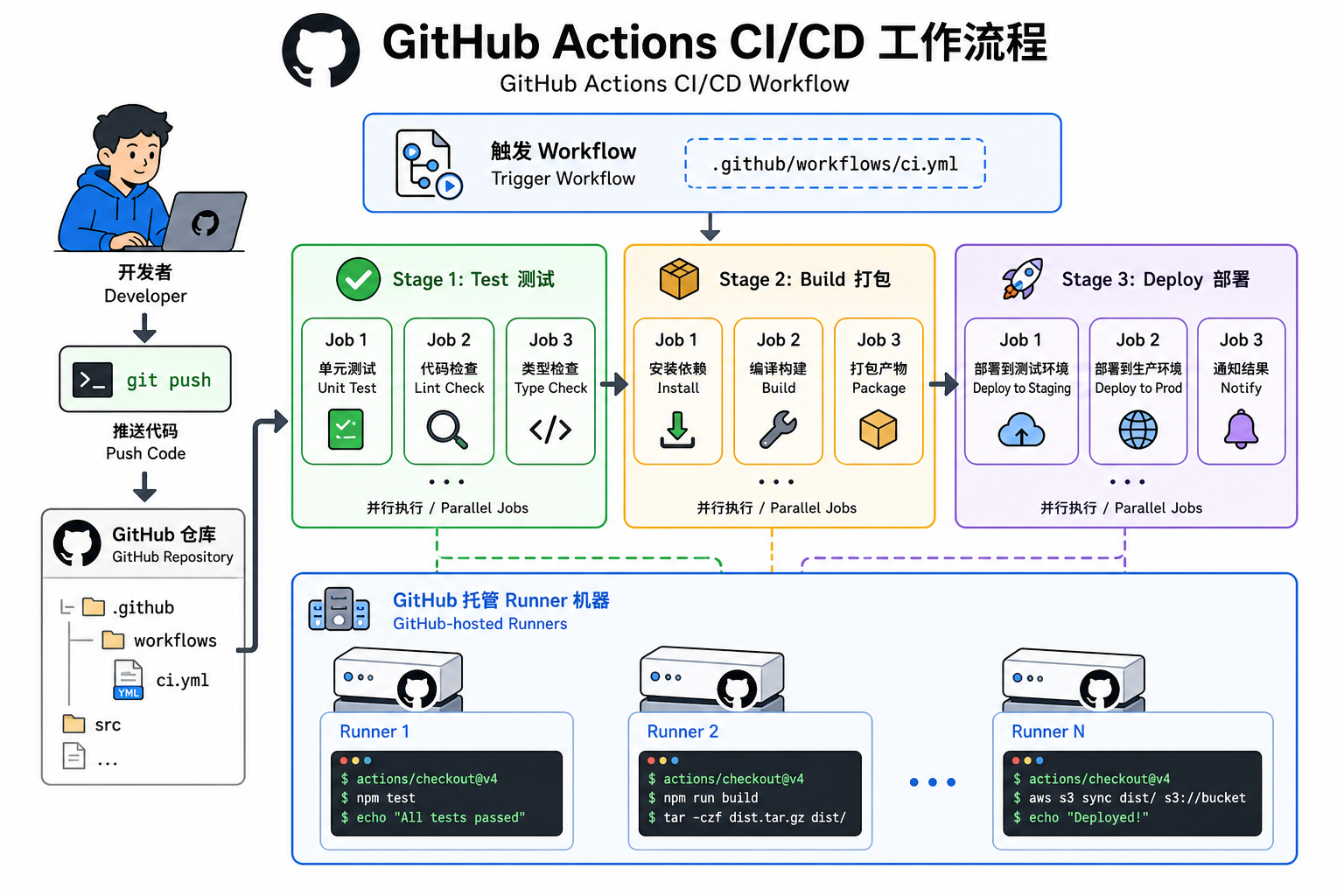
GitHub Actions 工作流示意

与 GitLab CI 的核心差异

维度 GitHub Actions GitLab CI/CD
配置文件 .github/workflows/*.yml(可多个工作流) 根目录 .gitlab-ci.yml(通常一个)
是否需单独安装 Runner 否,GitHub 提供托管 Runner 是,需注册 GitLab Runner
顶层结构 onjobssteps stagesjobsscript
阶段顺序 通过 needs 声明 Job 依赖 通过 stages 列表顺序
复用机制 uses: actions/xxx@v4 等 Action extendsinclude
分支/事件过滤 on.push.branchesif: 表达式 rules(推荐)或已弃用的 only/except
手动触发 workflow_dispatch when: manual
定时任务 schedule(cron 表达式) Pipeline Schedules + rules

两套语法不能互换:把 .gitlab-ci.yml 直接放进 GitHub 仓库不会生效。

工作逻辑框架

Workflow(工作流)

一次触发事件对应一次 Workflow Run。每个 YAML 文件定义一条独立工作流,可分别监听不同事件(如 CI 跑测试、Release 打标签发布)。

Jobs(作业)

工作流内的一个 Job 在同一 Runner 上顺序执行其 Steps。多个 Job 默认并行;用 needs 指定依赖后,才会按依赖关系串行。

Steps(步骤)

Job 内的最小执行单元,可以是:

  • run:在 Runner 上执行 Shell 命令
  • uses:调用社区或官方 Action(可复用的封装步骤)

Runners(运行器)

  • GitHub 托管 Runnerubuntu-latestwindows-latestmacos-latest 等,开箱即用
  • Self-hosted Runner:自建机器,适合内网部署、访问私有 Tomcat/Sonar 等场景

Artifacts / Cache

  • artifacts:跨 Job 传递构建产物(如 .war 包)
  • cache:缓存依赖目录(如 Maven ~/.m2),加速后续运行

Hello World 示例

在仓库根目录创建 .github/workflows/hello.yml

1
2
3
4
5
6
7
8
9
10
11
12
13
14
15
16
name: Hello World

on:
push:
branches: [main]
pull_request:
branches: [main]

jobs:
greet:
runs-on: ubuntu-latest
steps:
- name: Say hello
run: |
echo "Hello, GitHub Actions"
echo "Event=${{ github.event_name }}, Ref=${{ github.ref }}"

推送后可在仓库 Actions 页查看运行记录与日志。

GitHub Actions 实践

以下示例与 Git-7 中 Java Web 项目(cidemo)的五阶段场景对应:编译测试、打包、部署、Sonar 手动检查、Sonar 定时检查。

前置:Secrets 配置

敏感信息不要写入 YAML。在仓库 Settings → Secrets and variables → Actions 中配置:

Secret 名称 说明
SONAR_HOST_URL SonarQube 地址
SONAR_TOKEN Sonar 登录 Token
DEPLOY_SSH_KEY 部署机 SSH 私钥(若用 SSH 部署)

段末注释:Secrets 是 GitHub 提供的加密环境变量存储,仅在 Actions 运行时注入,日志中会自动脱敏。

完整工作流示例

.github/workflows/cidemo.yml

1
2
3
4
5
6
7
8
9
10
11
12
13
14
15
16
17
18
19
20
21
22
23
24
25
26
27
28
29
30
31
32
33
34
35
36
37
38
39
40
41
42
43
44
45
46
47
48
49
50
51
52
53
54
55
56
57
58
59
60
61
62
63
64
65
66
67
68
69
70
71
72
73
74
75
76
77
78
79
80
81
82
83
84
85
86
87
88
89
90
91
92
93
94
95
96
97
98
99
100
101
102
103
104
105
106
107
108
109
110
111
name: CIDemo CI/CD

on:
push:
branches: [main, develop]
pull_request:
branches: [main, develop]
workflow_dispatch: # 支持 Actions 页手动触发(含 Sonar 手动任务)
schedule:
- cron: '0 2 * * *' # 每天 UTC 02:00 执行 Sonar 定时检查

env:
JAVA_VERSION: '17'
MAVEN_OPTS: '-Dmaven.repo.local=${{ github.workspace }}/.m2/repository'

jobs:
# ---------- 阶段 1:编译与单元测试 ----------
test:
runs-on: ubuntu-latest
steps:
- uses: actions/checkout@v4
- name: Set up JDK
uses: actions/setup-java@v4
with:
java-version: ${{ env.JAVA_VERSION }}
distribution: temurin
cache: maven
- name: Run tests
run: mvn clean test

# ---------- 阶段 2:打包(仅 develop 分支) ----------
package:
needs: test
if: github.ref == 'refs/heads/develop' && github.event_name != 'schedule'
runs-on: ubuntu-latest
steps:
- uses: actions/checkout@v4
- uses: actions/setup-java@v4
with:
java-version: ${{ env.JAVA_VERSION }}
distribution: temurin
cache: maven
- name: Build WAR
run: mvn -B install -DskipTests
- name: Upload WAR artifact
uses: actions/upload-artifact@v4
with:
name: cidemo-war
path: target/*.war
retention-days: 7

# ---------- 阶段 3:部署到 Tomcat(自托管 Runner 示例) ----------
deploy:
needs: package
if: github.ref == 'refs/heads/develop' && github.event_name == 'push'
runs-on: self-hosted # 需事先在部署机注册 Self-hosted Runner
steps:
- name: Download WAR
uses: actions/download-artifact@v4
with:
name: cidemo-war
path: ./artifact
- name: Deploy to Tomcat
env:
SERVER_HOME_DIR: /home/runner/tomcat/cidemo-tomcat
run: |
echo '准备部署 war 包到 Tomcat'
cd "$SERVER_HOME_DIR"
sh bin/shutdown.sh || true
rm -rf webapps/cidemo.war webapps/cidemo
cp ../../artifact/*.war webapps/cidemo.war
nohup sh bin/startup.sh > logs/cidemo_nohup.log 2>&1 &

# ---------- 阶段 4:Sonar 手动检查 ----------
sonar-manual:
needs: test
if: github.event_name == 'workflow_dispatch'
runs-on: ubuntu-latest
steps:
- uses: actions/checkout@v4
with:
fetch-depth: 0 # Sonar 分析需要完整 Git 历史
- uses: actions/setup-java@v4
with:
java-version: ${{ env.JAVA_VERSION }}
distribution: temurin
cache: maven
- name: SonarQube scan (manual)
env:
SONAR_TOKEN: ${{ secrets.SONAR_TOKEN }}
SONAR_HOST_URL: ${{ secrets.SONAR_HOST_URL }}
run: mvn -B compile org.sonarsource.scanner.maven:sonar-maven-plugin:sonar

# ---------- 阶段 5:Sonar 定时检查 ----------
sonar-scheduled:
if: github.event_name == 'schedule'
runs-on: ubuntu-latest
steps:
- uses: actions/checkout@v4
with:
fetch-depth: 0
- uses: actions/setup-java@v4
with:
java-version: ${{ env.JAVA_VERSION }}
distribution: temurin
cache: maven
- name: SonarQube scan (scheduled)
env:
SONAR_TOKEN: ${{ secrets.SONAR_TOKEN }}
SONAR_HOST_URL: ${{ secrets.SONAR_HOST_URL }}
run: mvn -B compile org.sonarsource.scanner.maven:sonar-maven-plugin:sonar

与 GitLab 示例的对应关系

GitLab CI(Git-7) GitHub Actions
stages: test → install → run → sonar 多个 jobs + needs 表达顺序
only: branches on.push / on.pull_request
only: develop if: github.ref == 'refs/heads/develop'
when: manual workflow_dispatch + if: github.event_name == 'workflow_dispatch'
only: schedules on.schedule + if: github.event_name == 'schedule'
Shell 部署到本机目录 Self-hosted Runner 在部署机本地执行
明文 Sonar Token secrets.SONAR_TOKEN

Self-hosted Runner 注册(部署场景)

GitLab 需单独安装 Runner;GitHub 部署到内网 Tomcat 时,可在目标机器注册 Self-hosted Runner:

1
2
3
4
5
6
7
# 在 GitHub 仓库 Settings → Actions → Runners → New self-hosted runner 获取 token
mkdir actions-runner && cd actions-runner
curl -o actions-runner-osx-x64-2.323.0.tar.gz -L \
https://github.com/actions/runner/releases/download/v2.323.0/actions-runner-osx-x64-2.323.0.tar.gz
tar xzf ./actions-runner-osx-x64-2.323.0.tar.gz
./config.sh --url https://github.com/<owner>/<repo> --token <REGISTRATION_TOKEN>
./run.sh

生产环境建议以 systemd / launchd 服务方式常驻运行,并限制 Runner 标签(runs-on: [self-hosted, deploy])。

YAML 常用配置

工作流文件顶层与子级常用字段如下:

关键字 层级 必填 说明
name workflow 工作流显示名称
on workflow 触发事件(push、pull_request、schedule、workflow_dispatch 等)
env workflow / job / step 环境变量
jobs workflow Job 集合
runs-on job Runner 类型或标签
needs job 依赖的前置 Job,形成阶段顺序
if job / step 条件表达式,控制是否执行
steps job 步骤列表
uses step 二选一 引用 Action,owner/repo@version
run step 二选一 Shell 命令
with step Action 输入参数
secrets 通过 ${{ secrets.NAME }} 引用
permissions workflow / job 控制 GITHUB_TOKEN 权限(最小权限原则)
concurrency workflow / job 同一分支并发控制,避免重复部署
timeout-minutes job Job 超时(默认 360 分钟)
strategy.matrix job 矩阵构建(多版本 Java、多 OS 等)

on:触发事件

1
2
3
4
5
6
7
8
9
10
11
12
13
14
15
16
on:
push:
branches: [main, develop]
paths:
- 'src/**'
- 'pom.xml'
pull_request:
branches: [main]
workflow_dispatch:
inputs:
environment:
description: 'Deploy target'
required: true
default: 'staging'
schedule:
- cron: '0 3 * * 1' # 每周一 UTC 03:00

needs:阶段顺序

同一 needs 层级的 Job 可并行;下一层 Job 等待依赖全部成功后再运行(与 GitLab stages 行为类似):

1
2
3
4
5
6
7
8
9
10
11
12
13
14
15
jobs:
build:
runs-on: ubuntu-latest
steps:
- run: mvn package
test:
needs: build
runs-on: ubuntu-latest
steps:
- run: mvn test
deploy:
needs: test
runs-on: ubuntu-latest
steps:
- run: echo deploy

if:条件执行

1
2
3
if: github.ref == 'refs/heads/main' && github.event_name == 'push'
if: contains(github.event.pull_request.labels.*.name, 'deploy')
if: failure() # 仅在前序 step 失败时执行(常用于通知)

复用配置:reusable workflows

多仓库共用同一套 CI 逻辑时,可将工作流提取到独立仓库,通过 workflow_call 调用(类似 GitLab include):

1
2
3
4
5
6
7
8
9
10
11
12
13
14
15
16
17
18
# .github/workflows/reusable-test.yml(被调用方)
on:
workflow_call:
inputs:
java-version:
required: false
type: string
default: '17'
jobs:
test:
runs-on: ubuntu-latest
steps:
- uses: actions/checkout@v4
- uses: actions/setup-java@v4
with:
java-version: ${{ inputs.java-version }}
distribution: temurin
- run: mvn test
1
2
3
4
5
6
# .github/workflows/ci.yml(调用方)
jobs:
call-test:
uses: ./.github/workflows/reusable-test.yml
with:
java-version: '21'

构建状态徽章(Badges)

在 README 中展示最新工作流状态:

1
![CI](https://github.com/<owner>/<repo>/actions/workflows/cidemo.yml/badge.svg?branch=main)

也可使用 shields.io 自定义样式。

计费与限制(需知晓)

  • 公开仓库:GitHub Actions 免费,分钟数不限
  • 私有仓库:按账户套餐赠送分钟数;超出后按量计费
  • 托管 Runner 单 Job 默认最长 6 小时timeout-minutes 可改短)
  • 并发 Job 数受套餐限制

参考链接

-------------本文结束感谢您的阅读-------------